
MyLab / Mastering Dashboard1.4 - Get APK
You'll be able to download in few seconds.
Publisher Description
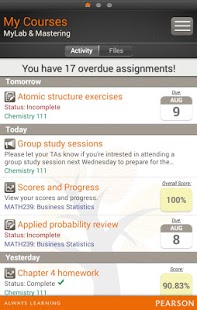
The MyLab & Mastering Mobile Dashboard is a free time-management companion for your MyLab & Mastering course experience that gives you the information you need to stay on target throughout your course.
The Mobile Dashboard provides instant, 24/7 access to course announcements, assignment due dates, scores, and results.* Convenient and easy to use, the app lets you navigate important information across multiple courses — even with different user names for each course — with just a swipe across the screen. And because course information is easily accessible, you can save time and stay engaged with your courses at all times.
You can stay up-to-date by receiving receive push notifications for system announcements related to your MyLab & Mastering courses.
If you are enrolled in a supported** Mastering course, you may also view document files and stream media files – like lectures, animations, and other video content – posted by your instructor. Document files can also be downloaded for later viewing.
You can stay up-to-date by receiving receive push notifications for system announcements related to your MyLab & Mastering courses.
End of Support Announcement
The MyLab & Mastering Mobile Dashboard will not be supported after August 2015. Please visit this Technical Support page for more information:
http://247pearsoned.custhelp.com/app/answers/detail/a_id/12906
* To work on assignments, you must sign in to your MyLab, Mastering, or XL product on your computer. At this time, you cannot complete homework via the Mobile Dashboard app.
** Supported products include (US versions only):
Mastering – MasteringA&P, MasteringAstronomy, MasteringBiology, MasteringChemistry, MasteringEngineering, MasteringEnvironmentalScience, MasteringGenetics, MasteringGeography, MasteringGeology, MasteringMicrobiology and MasteringPhysics
XL – MathXL, MathXL for School
MyLab – MyAccountingLab, MyEconLab, MyEngineeringLab, MyFinanceLab, MyFoundationsLab, MyMathLab, MyMathLab Global MyOMLab, MyReadingLab, MySkillsLab, MyStatLab, MyStudentSuccessLab, MyWritingLab
Please note: MyLabsPlus, CourseCompass, and most customized versions of the products listed above are not supported at this time. For steps to identify whether you’re enrolled in a CourseCompass or customized version of a supported product, please visit: http://247pearsoned.custhelp.com/app/answers/detail/a_id/11182
About MyLab / Mastering Dashboard
The company that develops MyLab / Mastering Dashboard is Pearson Education, Inc. Mobile. The latest version released by its developer is 1.4.
To install MyLab / Mastering Dashboard on your Android device, just click the green Continue To App button above to start the installation process. The app is listed on our website since 2014-08-20 and was downloaded 0 times. We have already checked if the download link is safe, however for your own protection we recommend that you scan the downloaded app with your antivirus. Your antivirus may detect the MyLab / Mastering Dashboard as malware as malware if the download link to com.pearson.m3d is broken.
How to install MyLab / Mastering Dashboard on your Android device:
- Click on the Continue To App button on our website. This will redirect you to Google Play.
- Once the MyLab / Mastering Dashboard is shown in the Google Play listing of your Android device, you can start its download and installation. Tap on the Install button located below the search bar and to the right of the app icon.
- A pop-up window with the permissions required by MyLab / Mastering Dashboard will be shown. Click on Accept to continue the process.
- MyLab / Mastering Dashboard will be downloaded onto your device, displaying a progress. Once the download completes, the installation will start and you'll get a notification after the installation is finished.
Program Details
System requirements
Download information
Pricing
Version History
version 1.4
posted on 2014-08-20
version 1.0.2
posted on 2013-03-26
Several fixes and updates
Disclaimer
External Download
We do not host MyLab / Mastering Dashboard on our servers. We did not scan it for viruses, adware, spyware or other type of malware. This app is hosted by Galad and passed their terms and conditions to be listed there. We recommend caution when installing it.
The APK Download link for MyLab / Mastering Dashboard is provided to you by apps112.com without any warranties, representations or guarantees of any kind, so access it at your own risk.
If you have questions regarding this particular app contact the publisher directly. For questions about the functionalities of apps112.com contact us.
